
Keep your plan up to date
Why your subscriptions never rewrite the plan on their own, and what the update prompt is asking you.
A plan is a decision about the months ahead. Your subscriptions and your receipts are a record of what is happening right now. Subscrr keeps the two apart: live data never changes a saved plan by itself.
What stays linked
Rows you built from your subscriptions, from your spending or from your receipt scans keep a link to that data, and a small circular-arrows icon sits next to their name in the table. When a price goes up, a service is cancelled or a new one appears, Subscrr sees the new totals, and the plan carries on with the numbers it already has. Rows you typed yourself are not affected at all, and neither is a linked row once you switch it to a rule of its own.
The prompt and the comparison
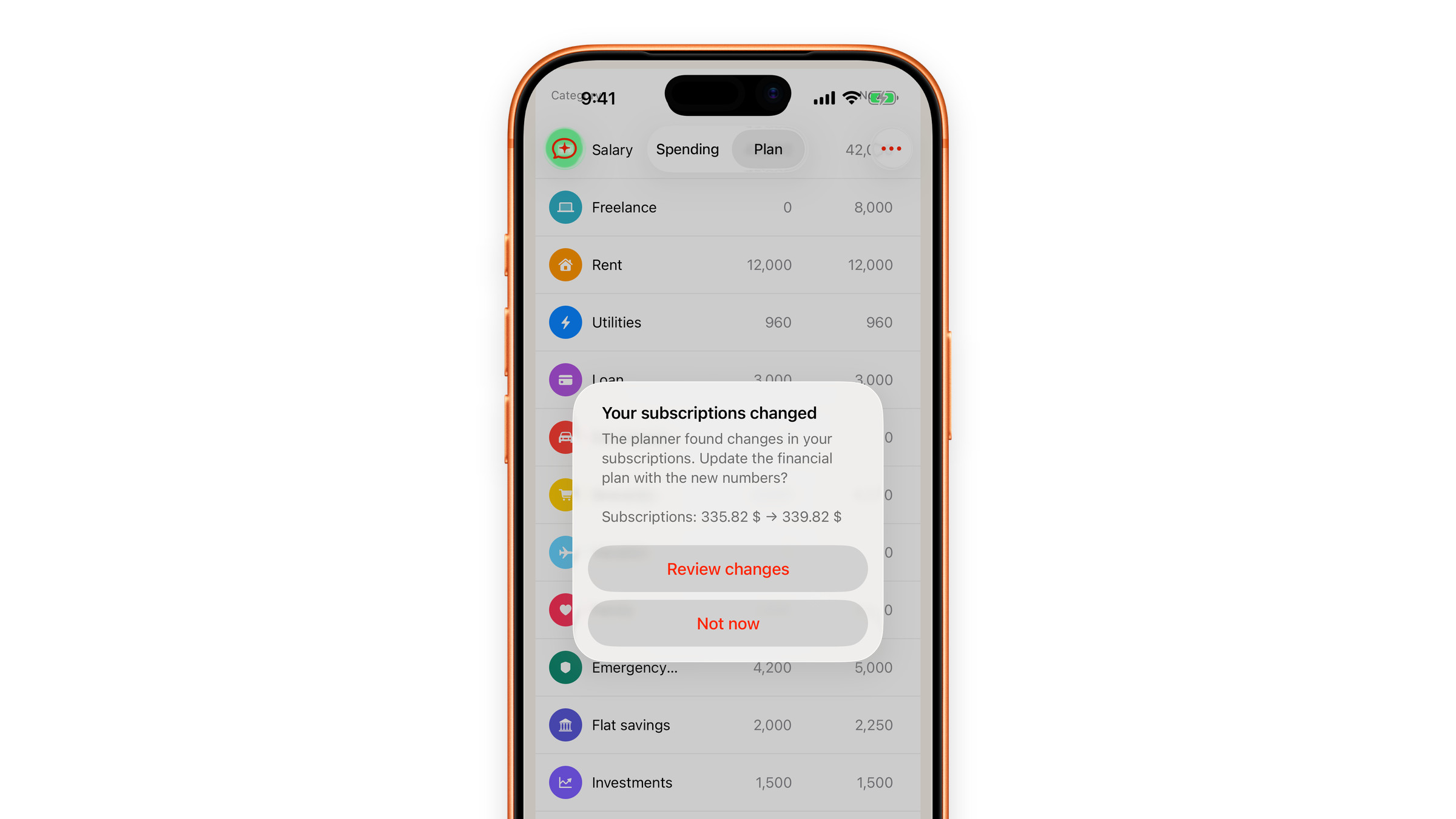
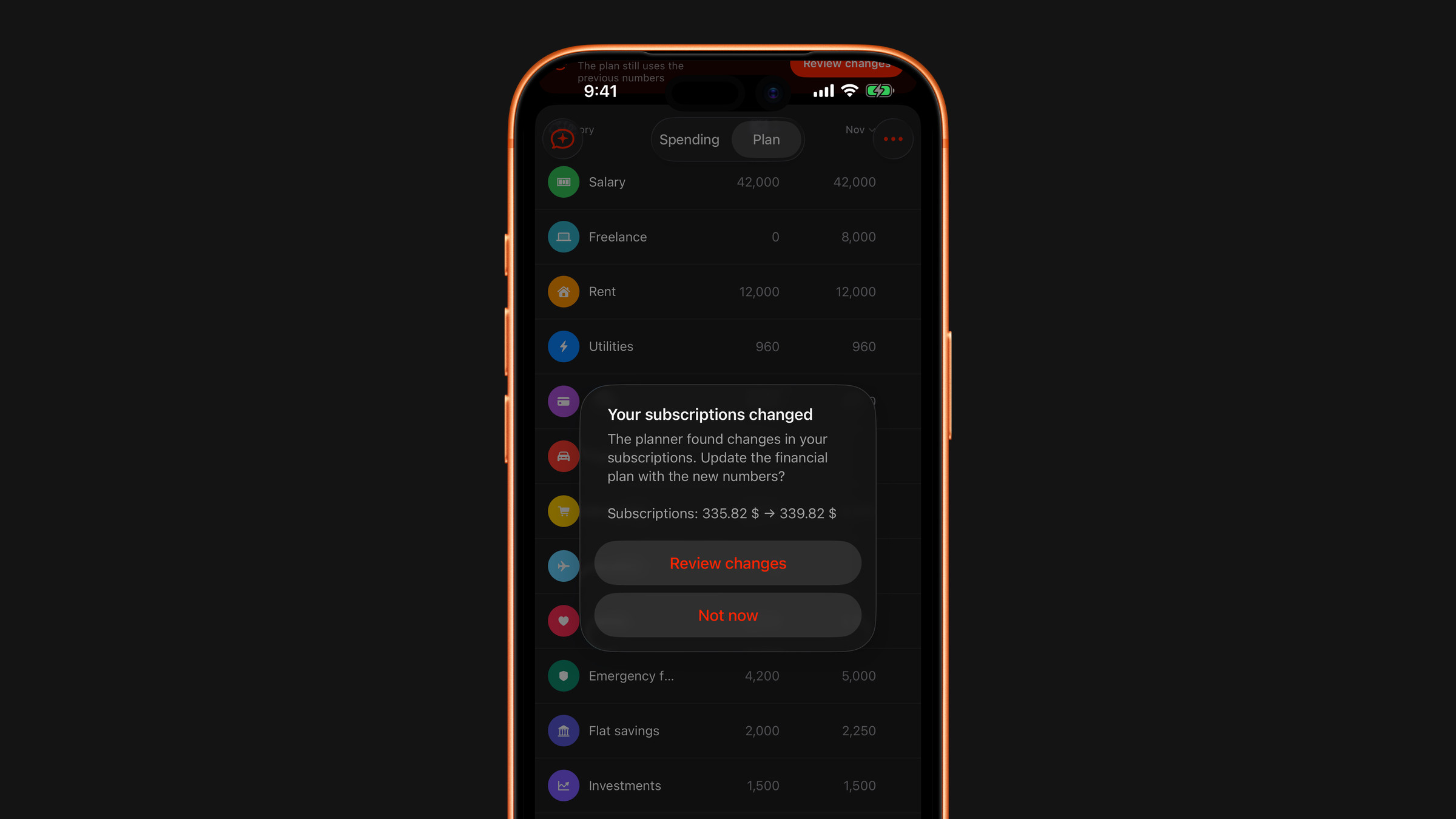
Next time you open Plan in the Spending tab, a prompt appears: Your subscriptions changed, with the line "The planner found changes in your subscriptions. Update the financial plan with the new numbers?" and, under it, up to three affected rows with the old and the new amount. A longer list ends with "and N more". When the change came from your spending or your receipts rather than your subscriptions, the same prompt is headed Your data changed.
The prompt has two buttons:
- Review changes opens a comparison titled Changes available. At the top, Plan changes by shows how much the plan moves per month in total. Below it every affected row says where the figure came from (From subscriptions, From spending or From receipt scans), with the old amount struck through above the new one.
- Not now leaves the plan exactly as it was.
The numbers go into the plan only from the comparison. Its Update plan button writes the new amounts into the linked rows and recalculates the rest of the horizon. Nothing else in the plan moves, apart from month-by-month figures you typed by hand inside those same rows, which the new amounts replace. The comparison has its own Not now as well, and closing it without updating counts the same way.
The same change is only ever offered once. After Not now the prompt goes quiet, and it stays quiet when you restart the app. A later change, a different price or another subscription, brings up a new one.
The "Changes available" strip
The plan does not pretend to be current. For as long as it and your data disagree, a strip sits near the top, under the summary tiles: Changes available, with the line "The plan still uses the previous numbers" and a Review changes button. That is the answer to "why does my plan disagree with my subscriptions": you told it to hold, and it held.
The whole strip is a button. Tap it whenever you are ready and the comparison opens, with Update plan on it. The strip goes away when you update, or when your data comes back to the numbers the plan already holds.
Why it works this way
If every price rise quietly rewrote the plan, you would never be sure whether the numbers in front of you are the ones you agreed to, or something the app decided while you were not looking. A plan that edits itself is a report. A plan you confirm is a decision.
So every figure in the plan table is there because you put it there or said yes to it, and it holds until you say otherwise.
Did this answer your question?